Total Commander 7.57a
Updated on 04 May 2012
By Anthony Buckner
By Anthony Buckner
Specifications
License:
Shareware (Free to try)
Updated:
Downloads:
53414
Platform:
Windows (All Versions)
Publisher:
C. Ghisler & Co.(more)
Website:
User Reviews:
Other versions:
7.0 beta 4, 7.0 beta 3, 7.0 beta 2
Do you like
Total Commander?
Total Commander?
FindMySoft Editor's Review
Total Commander – File Management Software Far Superior to Windows Explorer
If you want to access a file or folder in Windows, you could use the built-in Windows Explorer. That is what some users do when they want to manage their files. But there is one alternative file manager that can provide an extra level of functionality: Total Commander. It provides the file management functionality that you’ve grown accustomed to, but it does not stop there. It takes things to the next level by providing a long list of features and built-in tools.
The reason why some users stick with Windows Explorer is because it comes built into the Windows operating system. The fact that you have to download and install Total Commander should not put you off. The download process only took a couple of seconds. Installing the software on my computer also took a couple of seconds. And don’t think this is because I have a high-end, top of the line PC, because I don’t.
Total Commander focuses on helping you get things done and get them done quickly. In this regard we all know that using the keyboard is a lot faster than using the mouse. That is why Total Commander focuses mainly on keyboard shortcuts. For example, if you want to move a file you can just press F6, if you want to create a new folder you can press F7 and if you want to delete a folder you can press F8.
You could of course use the mouse. This is always an option, especially if you find that using the keyboard is something reserved for the more advanced computer user. You can click the buttons that correspond to a specific action, you can drag and drop files and folders, you can right click a file or folder and access all the functions provided in the context menu that appears. There is one other neat trick available for you in Total Commander: the button bar can be customized. Shortcuts for various functions are displayed on the button bar by default, for example a shorcut for Notepad. You can customize the button bar to display shortcuts for other programs and other functions.
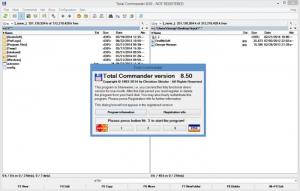
File management is the main function of Total Commander. To help you better manage all the files and folders you have stored on your computer, Total Commander provides a double-pane interface. If you want to access C:/Program Files and D:/Games you can open the first location in the left hand pane and the second location in the right hand pane. Then you can easily transfer files between the two directory paths. With Windows Explorer you had to either open two windows and switch from one to another or you had to access each location one at a time. In the double-pane interface support for three different views is provided: Full view, Brief view and Tree view.
That takes care of the basic file management capabilities that Total Commander provides. Now let’s take a look at its hidden talents. Perhaps not hidden because they are in plain sight – let’s just say features that you wouldn’t immediately think of. Here are some of the extra features that Total Commander comes with: a FTP client, enhanced search function, ZIP viewer, disk analyzer, file synchronizer, multi-rename tool, quick file filter and many, many more.
The thing I liked most about this piece of software is the fact that you can customize pretty much every aspect of it. The Button bar customization I mentioned earlier is just the tip of the iceberg; thanks to the extensive configuration menu you can customize Total Commander according to your every whim.
The bottom line is that Total Commander can be installed in no time at all, and once installed it will provide the computer user with functionality that far surpasses that provided by Windows Explorer.
Pros
Easy to install
Extensive file management capabilities
Numerous customization options
Comes with plenty of built-in tools
Cons
Shareware: use it free of charge for a period of 30 days; when the trial period is over you will have to register the program.
Not exactly what you would call pretty, but I wouldn’t hold this against it
More suited for the medium and advanced user rather than the novice computer user
Publisher URL: http://www.ghisler.com
The reason why some users stick with Windows Explorer is because it comes built into the Windows operating system. The fact that you have to download and install Total Commander should not put you off. The download process only took a couple of seconds. Installing the software on my computer also took a couple of seconds. And don’t think this is because I have a high-end, top of the line PC, because I don’t.
Total Commander focuses on helping you get things done and get them done quickly. In this regard we all know that using the keyboard is a lot faster than using the mouse. That is why Total Commander focuses mainly on keyboard shortcuts. For example, if you want to move a file you can just press F6, if you want to create a new folder you can press F7 and if you want to delete a folder you can press F8.
You could of course use the mouse. This is always an option, especially if you find that using the keyboard is something reserved for the more advanced computer user. You can click the buttons that correspond to a specific action, you can drag and drop files and folders, you can right click a file or folder and access all the functions provided in the context menu that appears. There is one other neat trick available for you in Total Commander: the button bar can be customized. Shortcuts for various functions are displayed on the button bar by default, for example a shorcut for Notepad. You can customize the button bar to display shortcuts for other programs and other functions.
File management is the main function of Total Commander. To help you better manage all the files and folders you have stored on your computer, Total Commander provides a double-pane interface. If you want to access C:/Program Files and D:/Games you can open the first location in the left hand pane and the second location in the right hand pane. Then you can easily transfer files between the two directory paths. With Windows Explorer you had to either open two windows and switch from one to another or you had to access each location one at a time. In the double-pane interface support for three different views is provided: Full view, Brief view and Tree view.
That takes care of the basic file management capabilities that Total Commander provides. Now let’s take a look at its hidden talents. Perhaps not hidden because they are in plain sight – let’s just say features that you wouldn’t immediately think of. Here are some of the extra features that Total Commander comes with: a FTP client, enhanced search function, ZIP viewer, disk analyzer, file synchronizer, multi-rename tool, quick file filter and many, many more.
The thing I liked most about this piece of software is the fact that you can customize pretty much every aspect of it. The Button bar customization I mentioned earlier is just the tip of the iceberg; thanks to the extensive configuration menu you can customize Total Commander according to your every whim.
The bottom line is that Total Commander can be installed in no time at all, and once installed it will provide the computer user with functionality that far surpasses that provided by Windows Explorer.
Pros
Easy to install
Extensive file management capabilities
Numerous customization options
Comes with plenty of built-in tools
Cons
Shareware: use it free of charge for a period of 30 days; when the trial period is over you will have to register the program.
Not exactly what you would call pretty, but I wouldn’t hold this against it
More suited for the medium and advanced user rather than the novice computer user
Publisher URL: http://www.ghisler.com
System Requirements
Pentium class or faster processor
Do you like Total Commander
Advertising
Popular News
The free AboutOne app is currently exclusive to Windows Phone. The app is available for free in the Markeplace.
Google rolled out Chrome 19 to the Stable Channel. This version fixes some security problems and adds tab syncing capabilities.
Total Commander Awards
Total Commander Editor's Review Rating
Total Commander has been reviewed by George Norman on
21 Oct 2009. Based on the user interface, features and complexity, Findmysoft has rated
Total Commander
5
out of 5 stars, naming it EssentialYour Rating
Top Downloads
2.
Opera5.
Trillian8.
AIM9.
Skype10.
Ad-Aware12.
Nero13.
Google Earth14.
Picasa15.
Winamp16.
iTunes17.
RealPlayer18.
uTorrent19.
eMule20.
WinRAR21.
BitComet22.
WinZip23.
Shareaza24.
CCleaner25.
Recuva26.
Tweak UI27.
CuteFTP Home29.
Adobe Reader30.
NewsPiperBecome A Fan!
Link To Us!
Total Commander
HTML Linking Code
HTML Linking Code
Latest Reviews